Monday, January 30, 2012

Tech companies team up to combat email scams


Foxnews I  Published January 30, 2012
| Associated Press
Thumbs Up
Reuters
Facebook is teaming up with its tech peers to fight scams.


Google, Facebook and other big tech companies are jointly designing a system for combating email scams known as phishing.
Such scams try to trick people into giving away passwords and other personal information by sending emails that look as if they come from a legitimate bank, retailer or other business. When Bank of America customers see emails that appear to come from the bank, they might click on a link that takes them to a fake site mimicking the real Bank of America's. There, they might enter personal details, which scam artists can capture and use for fraud.
To combat that, 15 major technology and financial companies have formed an organization to design a system for authenticating emails from legitimate senders and weeding out fakes. The new system is called DMARC -- short for Domain-based Message Authentication, Reporting and Conformance.
DMARC builds upon existing techniques used to combat spam. Those techniques are designed to verify that an email actually came from the sender in question. The problem is there are multiple approaches for doing that and no standard way of dealing with emails believed to be fake.
The new system addresses that by asking email senders and the companies that provide email services to share information about the email messages they send and receive. In addition to authenticating their legitimate emails using the existing systems, companies can receive alerts from email providers every time their domain name is used in a fake message. They can then ask the email providers to move such messages to spam folder or block them outright.
According to Google, about 15 percent of non-spam messages in Gmail come from domains that are protected by DMARC. This means Gmail users "don't need to worry about spoofed messages from these senders," Adam Dawes, a product manager at Google, said in a blog post.
"With DMARC, large email senders can ensure that the email they send is being recognized by mail providers like Gmail as legitimate, as well as set policies so that mail providers can reject messages that try to spoof the senders' addresses," Dawes wrote.
Work on DMARC started about 18 months ago. Beginning Monday, other companies can sign up with the organization, whether they send emails or provide email services. For email users, the group hopes DMARC will mean fewer fraudulent messages and scams reaching their inbox.
The group's founders are email providers Microsoft Corp., Yahoo Inc., AOL Inc. and Google Inc.; financial service providers Bank of America Corp., Fidelity Investments and eBay Inc.'s PayPal; online service companies Facebook, LinkedIn Corp. and American Greetings Corp. and security companies Agari, Cloudmark, eCert, Return Path and the Trusted Domain Project.
Google uses it already, both in its email sender and email provider capacities. The heft of the companies that have already signed on to the project certainly helps, and its founders are hoping it will be more broadly adopted to become an industry standard.

Monday, January 16, 2012

Nigerian email scam ends in real-life kidnapping

Published January 16, 2012
| TechMediaNetwork
South African police have rescued a man and his daughter who were kidnapped by a Nigerian gang after the duo flew to Africa to claim their multimillion fortune promised to them in a phony email.
The unnamed victims, a 65-year-old South Korean man and his daughter, in her 30s, flew to Johannesburg last week after receiving an email promising them tens of millions of dollars, the Guardian reported.
The man was told he had to come to Africa to claim the money; when he landed at O.R. Tambo International Airport, he and his daughter were picked up by a driver (who was working for the gang), and dropped off at a house in a Soweto township. The driver managed to escape, but his passengers were not as lucky; they were held hostage for four days.
The kidnappers, five Nigerians and a South African, demanded a $10 million ransom from the kidnapped man's wife in South Korea, which was to be deposited to an account in Singapore, Col. McIntosh Polela of the South African police service told the Guardian. The amount was negotiated down to $120,000.
The man's wife alerted the South Korean embassy in South Africa, and the police raided the home and freed the victims. The man and his daughter returned to Korea without appearing in court.
"They declined to testify because they were traumatized," Polela said. "They were also embarrassed at being lured to South Africa. This is common once victims discover they've been fooled."

Tuesday, January 10, 2012

iPhone celebrates fifth birthday -- How has it changed?


Opening weekend sales numbers proved the iPhone 4S to be the most successful iPhone launch in Apple's history.
Opening weekend sales numbers proved the iPhone 4S to be the most successful iPhone launch in Apple's history

(WIRED) -- Gadget fans may be focused on the CES trade show this week, but there's something else notable going on today: It's the iPhone's fifth birthday.
Five years ago today, Apple unveiled the original iPhone to the world. It wasn't a tightly kept secret, shrouded in mystery and speculation like more recent Apple announcements, but it was arguably the world's most anticipated gadget launch.
Although its form factor -- a capacitive touchscreen candy bar -- hasn't dramatically changed over the years, each iteration of the iPhone has yielded important improvements. Let's take a look back at how the iPhone revolutionized what we thought a phone could be.
The iPhone Is Revealed
"An iPod, a phone, an internet mobile communicator," Jobs said when preparing to introduce the iPhone in January 2007. "An iPod, a phone, an internet mobile communicator.... These are not three separate devices!"

The original iPhone launched on AT&T with a handful of Apple-created apps. It had a 320×480 resolution, 3.5-inch capacitive touchscreen and 2-megapixel camera, and ran iOS 1.0. Inside, it featured a 412MHz ARM 11 processor, a proximity sensor, and an accelerometer.
Priced at $499 and $599 for 4GB and 8GB models, the iPhone didn't actually go on sale to eager hordes of consumers (hundreds of whom waited outside Apple Stores) until June 29.
"As a device, it's a genre-bender," former Gadget Lab editor Dylan Tweney said in his review of the landmark device. "Never before have American consumers had access to a phone that is simultaneously so powerful, so elegant, and that performs so many functions."
iPhone 3G, the App Store and iOS 2.0
Apple's second generation iPhone debuted in the summer of 2008. Internally, it was largely identical to its predecessor: same processor, same type of display, same 2.0 megapixel camera, same amount of memory. But the iPhone 3G, as the name implied, now supported 3G network operability, as well as GPS.
More importantly, though, the launch of the 3G was accompanied by iOS version 2.0, which included an industry-altering addition: the App Store. The App Store finally let independent, third-party developers legally create apps for the device with a 70/30 revenue split weighted toward Apple.
The App Store has been an incredible success story for Apple and developers alike. It houses more than half-a-million apps, and there's been more than 18 billion downloads to date. Pretty much every mobile platform has its own app market now, and most aremodeled similarly to Apple's.
iPhone 3GS Takes Photography Seriously
The iPhone 3GS was primarily an incremental improvement over the 3G, but it included some notable hardware improvements that would continue through later iterations of the phone.
First, the 3GS included a camera upgrade: a 3-megapixel, autofocusing camera that shot decent video that could be edited and easily sent to YouTube or other destinations. Photography would become an increasingly important feature for iPhone users. The processor was upgraded to a 600MHz Samsung chip, and the display was upped to 480×320 pixels. The 3GS also added a compass, a tool that would prove incredibly useful in apps like Google Maps.
On the software side, the 3GS also added Voice Control, and iOS, now at version 3.0, finally added a cut/copy/paste functionality to the system.
iPhone 4: Prototype Leak, 'Antennagate' and Verizon
The iPhone 4 stunned the world with its radically redesigned look, which Gizmodo revealed early after getting its hands on a prototype.
A 3.5-inch Retina Display put pretty much every other smartphone display to shame: At 960×640 and bearing a 326ppi pixel density, it offered pixels smaller than the human eye could detect. The iPhone 4 was also encased front and back by slim slabs of glass, and ringed by an aluminum rim. The visual conceit was slick, and Apple received kudos for its smart industrial design refresh.
Unfortunately, that aluminum rim became the source of a debacle known as "Antennagate": Because of the external antenna design of the phone, if users held it a particular way, they would experience a drop in signal strength.
The iPhone 4 debuted in June 2010, still on AT&T like its predecessors, but in January 2011, Apple expanded availability toVerizon.
iPhone 4S Delivers Siri
Expecting an entirely differently designed iPhone 5, some Apple fans were disappointed by the announcement of merely an "iPhone 4S." However, pre-sale numbers and opening weekend sales numbers proved the 4S to be the most successful iPhone launch in Apple's history.
A major reason for the success of the 4S was its new voice-controlled virtual assistant, Siri. Hackers attempting to port Siri toother iOS devices have almost succeeded, but the solution just isn't available for the masses. Others though, are more interested in hacking Siri to control other gadgets in their lives like thermostats or a rotary dial phone.

Thursday, January 5, 2012

Work Faster in Microsoft Word: 10 Secrets


Ten Microsoft Word Secrets
Not everything that Microsoft Word 2010 can do is obvious from a quick look at the tools on the main ribbon toolbar. Some features are buried in the Options menu or in dialog boxes, and others take the form of keyboard shortcuts or simply aren't easy to see.

1. Create Lines for a Blank Form
Would you like to be able to insert a cent symbol or type the accented Ã© characters inrésumé, directly from the ribbon toolbar? How about adding your company's specialized terminology to the built-in Word dictionary? You can have these and other options for working faster and smarter in Word at your fingertips if you know where to find them and how to set them up.
Creating a form with custom dot leader tabs; click for full-size image.Creating a form? Custom dot leader tabs let you easily create the blank lines.When a printed document--such as a form--needs typed or handwritten information added to it, you can use tabs to draw the blank lines. Start by typing the text (such as Name:) that prompts the form's reader to enter information on the blank line that you will draw; then press the spacebar, and select the Home tab on the ribbon toolbar.
Locate and click the Paragraph dialog launcher icon in the bottom right of the Paragraph group, and click the Tabs button at the foot of the Paragraph dialog box. Here you can create your own tabs--you'll need a single tab stop at the point where the dotted line should finish.
To set the margin at 6 inches in a letter-size document with 1-inch margins, for example, type 6"into the Tab Stop Position box, choose Right for the Tab Alignment, and choose 2 as the Leader to get a dotted line. The click Set and finally OK.
Back in the document, place the cursor where you want to draw the line; press the Tab key on your keyboard, and a dotted line will appear drawn from the blank space all the way to where you set the right tab. Press Enter twice, type the next prompt (such as Address:) and pressTab again. Every time you do this, a new dotted line will appear. When you're ready to return to normal editing, press Enter once and then press Ctrl-Shift-N to return to Normal paragraph style; and the default tabs will immediately reappear.

2. Label Items With Sequential Numbers

Field codes for automatic sequential numbering; click for full-size image.Use field codes to number tickets and coupons automatically and sequentially.Word lets you create elements within documents that appear in numeric order, such as printed coupons or event tickets. You can automatically create sequentially numbered items by using field codes. First design the coupons or tickets; and, you can place multiple tickets on a page inside table cells, if you like.
Click the location where the first ticket number should appear and selectInsert, Quick Parts, Field from the Categories list. Then selectNumbering, and from the list below choose SEQ. Next, click Optionsfollowed by the Field Specific Switchestab. After the letters SEQ in the Field Codes box, type a bookmark name that only you will see, such as ticketnumber, followed by a letter space, the marker \r, another letter space, and then the starting ticket number. Thus, to start at the number 1000, you would use this field code:
SEQ ticketnumber \r 1000
Click OK twice when you're done. Starting at the location where the next number should appear, repeat the process, this time using this field code:
SEQ ticketnumber \n
Click OK twice. The next-larger number (1001) should appear in the designated place. Copy this field code and add it everywhere you need an incrementally larger number. You can perform this operation as many times as you need to. If the numbering doesn't automatically increase incrementally, force it to do so by pressing Ctrl-A to select the document and then pressing F9to update the fields.
At any time, you can change the start number by clicking the first field code you added and then pressing Shift-F9 to view the field code. Replace the number 1000 with your new starting number, and then press Shift-F9 again to hide the field code. To update all of the codes to reflect your new starting number, press Ctrl-A followed by F9.

3. Reverse the Page Print Order

Reverse page print order; click for full-size image. Reverse the order in which pages of a document print, and save yourself the trouble of sorting pages manually.If the pages in your document are printed the wrong way around, you can reverse the print order by selectingFile, Options, Advanced, and then scrolling to find the Print group of options (these are different from and in addition to the Printing Options in the Display settings). Locate and change the setting of the Print Pages in Reverse Order checkbox; if it was enabled, disable it, or vice versa. Finish by clicking OK. In the future, documents will print in reverse order, saving you the trouble of having to reorder them. This setting will remain in place the next time you open Word, and it will apply to all documents.

4. Save Images as Building Blocks

Save an image as a Quick Part; click for full-size image.When you save an image as a Quick Part, you can add it to any document at any time.When you need to add a repeating image (such as a logo) to your documents, you can save it as a building block for easy insertion.
First, insert your image into a document and format it to look the way you want it to. Click the image to select it, choose Insert, Quick Parts, and then choose Save Selection to Quick Part Gallery. Type a name for the image, and select a gallery to add it to (Quick Parts is a good choice); then change the Category setting toGeneral or add a new category if you wish. Type a description of the image, and select it to save it in Building Blocks.dotx, a file that Word automatically creates during this process. End by clicking OK.
The image will be stored permanently in your building blocks collection, and you can add it to any document by choosing Insert, Quick Parts and clicking to select it from among the items displayed there.

Tuesday, December 27, 2011

Favorite Downloads of 2011


At the end of another year, PCWorld reviewers name downloads and Web programs we liked so much we just kept on using them.

All year long, we PCWorld reviewers immerse ourselves in desktop programs and Web software. After evaluating a program, often we uninstall it—but several of this year's finds earned places in our workflows and/or our hearts. These programs and services are the ones we reviewed for PCWorldDownloads and also kept using for our own productivity and enjoyment. Perhaps you started using them this year, too…and if not, well, a shiny new year is right around the corner.
(To get all of the download links in one convenient list, see our "PCWorld's Favorite Downloads of 2011" collection. And click on each image below to see it in full size; click on "Close" in the image's bottom right to return to this list.)


Improve Your Productivity and Security

CloudMagic
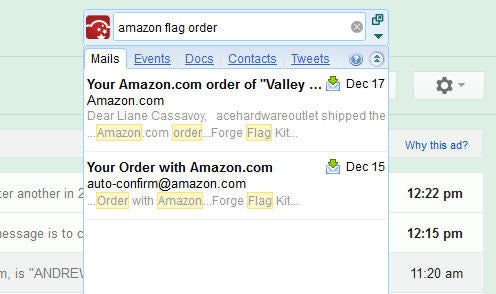
If there's one thing I could use more of, it's time. Well, and money, too. And sleep. CloudMagic may not be putting money in my bank account or helping me catch more Zs, but this handy little Firefox extension sure is saving me time. It searches my Gmail, Google Calendar, Google Docs, and Twitter accounts in what seems like record time. And its results are unfailingly accurate, too. What more could I want?
Read the full review and download CloudMagic beta (free).
--Liane Cassavoy
Visual Thesaurus
If you love words, think that reading a dictionary is great fun, or simply need a more organic way to search for synonyms, Visual Thesaurus is a great online resource. The dynamic, intuitive graphical interface is intelligent, playful, and educational. On the surface, it offers a tree-like visual structure that displays related synonyms in branches, surrounding the word you looked up. Click a synonym to display the next level of related words. Definitions are also a click away. We've found Visual Thesaurus so helpful that it is always open in one of our Internet browser tabs, so we can refer to it quickly while writing.
Read the full review and download Visual Thesaurus ($20, free trial).
--Sally Wiener Grotta and Daniel Grotta
Foxit Reader
The original lightweight alternative to Adobe Reader strayed from the winning formula for a while by getting fat, installing junk, and generally trying to do much. It's back on point with a clean, intuitive interface--and back on my PC opening PDFs faster than Adobe Reader and rendering them every bit as cleanly.
Read the full review and download Foxit Reader 5 (free).
--Jon Jacobi
LastPass
I used to waste a lot of brain power remembering all of my passwords. The ones for my email accounts. And my credit card accounts. And my online shopping accounts. Now, I'm relying on LastPass instead. It not only remembers and organizes all of my passwords for me, but it also generates secure ones. With all of the brain power I'm saving, I could spend my free time solving complex mathematical equations. I'm not, but I could be. Maybe.
Read the full review and download LastPass 1.8 (free).
--Liane Cassavoy


Expand Your Artistic Horizons

ArtRage Studio Pro
I can't go into an art supply store without buying something, because I always go, "Ooooh! I'd love to try that." I have boxes of paint sets, canvases, and brushes that I've never used. With ArtRage Studio Pro I can paint to my heart's content, without having to buy the supplies. And even though I don't have much artistic talent, ArtRage is intuitive, gives me instantly beautiful results, and makes me want to practice more.
Read the full review and download ArtRage 3.5 ($80, 30-day free trial).
--Clare Brandt
Corel Painter
I really enjoyed reviewing Corel Painter 12, because I felt it manages to meld the world of soft "analog" painting with the digital sophistication of a modern graphics editor. Making pen strokes on my Wacom tablet and watching them dry and blend with what I already put on paper was an inspiring experience. It made me want to paint.
Read the full review and download Corel Painter 12 ($429, free trial).
--Erez Zukerman
Carrara
What I like about Carrara is that it makes 3D design feel accessible. It does take longer to master than Google SketchUp, but you can create commercial-level 3D graphics and organic-looking objects with Carrara. Creator DAZ 3D offers a huge catalog of models, characters, and character costumes that you can buy and integrate into your scenes. Carrara is complex, but well-made and fun to use.
Read the full review and download Carrara 8 ($150, buy-only).
--Erez Zukerman


Beautify Your Desktop (and Beyond)

Lonely Landscapes Windows 7 Theme
I'm tired of the typical landscape photography fare: tropical sunsets, green meadows, majestic mountains. I prefer a more original take on the world that surrounds us. I love the Lonely Landscapes Windows 7 theme because the contributors each bring their own unique perspective to landscape photography. For example, instead of a mundane dock scene, you get an ethereal image of a lonesome jetty; instead of the typical orange sunset, you get a desaturated and almost ghostly take on the scene.
Read the full review and download Lonely Landscapes Windows 7 Theme (free).
--Kim Saccio-Kent
Chinese Watch Shop
Romantic script font Champignon, flirty brush script Doris Day, and futuristic Orbitron are fine additions to any font lover’s collection…but my hands-down favorite for the year is Downloads underdog Chinese Watch Shop by font folklorist Daniel Gauthier. Quirky to set, gawky on its feet, and boldly irreverent, Chinese Watch Shop breaks rules to stay true to its nature.
As a designer at PCWorld magazine I work with fantastic typographer-approved fonts every day, but on my own time I prefer the company of a difficult personality--a font that challenges and surprises me as the words hit the page. Gauthier spotted a handful of characters on a shop sign in Hamilton, Ontario, and forged ahead to produce this little gem. A little attitude does a long year good. My pork pie hat is doffed to Chinese Watch Shop and Mr. Gauthier.
Read the full review and download Chinese Watch Shop (free).
--Kate Godfrey
Day of the Dead Windows 7 Theme
Dia de los Muertos is celebrated throughout Mexico and Latin America on November 2 every year. It's a time to celebrate departed loved ones and honor their memories by decorating altars, holding fiestas, and creating calaveras--whimsical skeletons or skulls. One of my favorite downloads this year, the Day of the Dead Windows 7 Theme, puts a parade of colorful folk-art calaveras on your desktop.
Read the full review and download Day of the Dead Windows 7 Theme (free).
--Kim Saccio-Kent
Kittens Windows 7 Theme
I love felines, so it was pretty easy to choose my favorite Windows 7 theme this year: Kittens. Load up this theme and you get cuteness overload on your desktop with eight beautifully shot photographs of adorable kittens. The custom sound effects are fun, too--although one user complained that his real cats do not find them amusing.
Read the full review and download Kittens Windows 7 Theme (free).
--Kim Saccio-Kent


Play These Games for a While…Or Forever…

DC Universe Online
DC Universe Online is truly the massively-multiplayer online game for those who hate MMOs. It's got DC Comics style all over it, is fast paced and arcade-y, and lets you level up swiftly. And you can play through the whole game by yourself, if you want. Since my review, it's gone free to play, meaning it's an even better deal. It does still have occasional bugs and crash issues, so make sure your video drivers are updated all the way.
Read the full review and download DC Universe Online (free).
--Steve Horton
Aurora
Galactic 4X game Aurora is buggy, obtuse, and in appearance...well, you can't even say it has a great personality, because it's finicky, uncommunicative, and prone to sullen fits in which you know something's wrong but it won't tell you what. Despite all that, I've spent more time playing Aurora than I have any other game I've reviewed this year, and am still hooked.
On about my ninth restart, I made it 20 years into game time before mineral shortages made progress nigh impossible. On my tenth restart, I have better colonies and trade routes 6 years in than my last game managed in 20, and my first true warships (the Iron Duke-class jump frigates), have rolled off the line and are conducting fleet training exercises in-system. Despite this seeming mastery, I've barely scratched the surface. It would not be unfair to say that Aurora combines the adrenaline-pumping action of balancing your checkbook with the aesthetic appeal of Visual BASIC circa 1995... but it somehow keeps luring me back in for one more round of redesigning ordnance payloads, juggling command assignments, and dreading the "Unknown Thermal Contact" message that means it's time to see if I've finally learned how to design an effective combat force.
Read the full review and download Aurora (free).
--Ian Harac


Play With Music and Video Files

Amazon Cloud Music Player
Imagine a world in which your PC's digital music collection would be available to you wherever you were. Whether you were using a friend's computer, toting a smartphone or a tablet, or sitting down with an eReader like a Kindle or a Nook, you could listen to every track. That world exists, and you can get to it by using the Amazon Cloud Music Player. Install the Amazon MP3 uploader app, upload your files, and then listen via the Web or an Android app anywhere, anytime.
Read the full review and download Amazon MP3 Uploader for Amazon Cloud Music Player (free).
--Preston Gralla
Freemake Video Converter
Freemake Video Converter is a free app that converts almost any video format into any other video format, can extract audio into MP3s, and can even create DVD or Blu-ray files suitable for burning. Be sure to deselect the third-party toolbar when you install, but otherwise, it's highly recommended.
Read the full review and download Freemake Video Converter 3.0.1(free).
--Steve Horton